


 7 minutes read
 Pokémon TCG Pocket Explained: Learn, Build & Win Like a Pro!
 Molly Snyder
Update on December 2, 2025
Molly Snyder
Update on December 2, 2025
With Pokémon TCG Pocket, you can trade, battle, and gather hundreds of Pokémon cards on both iOS and Android. Although opening packets might take a while, this advice will help you gather more quickly.
Additionally, you’ll learn how to build powerful decks and finish Secret Missions. Whether you play for free or pay a little fee, these suggestions will help you enjoy the game and swiftly build your card collection.
Part 1: What Is Pokémon TCG Pocket
Pokémon TCG Pocket is the mobile adaptation of the well-known Pokémon Trading Card Game. Booster packs can be opened, decks can be created, and battles can be fought against AI or other players.
The game includes unique visually appealing cards and is accessible to both novices and experts alike, no physical cards are needed.
Part 2: How Pokémon TCG Pocket Works
1. Start Collecting Cards
Open booster packs to get Pokémon, Trainer, and Energy cards. Each pack gives you points you can use later to get the cards you want.
2. Build Your Deck
Combine cards from different expansions to create a strong deck. Strategy matters choose cards that work well together for battles.
3. Battle and Compete
Test your skills by battling AI or other players. Daily missions and events give rewards like Pack Hourglasses, Poke Gold, and shop tickets, helping you open more packs and improve your deck.
4. Customize Your Game
Decorate your cards with Shinedust, personalize your play mat, pick card sleeves, and change your battle coin.
5. Play Anywhere
Enjoy pokemon tcg pocket pc. Collecting, battling, and showing off your deck is easy and fun for everyone.
Part 3: How to Get Cards Fast in TCG Pocket
In Pokémon TCG Pocket, creating a competitive deck might be difficult, particularly if you desire your favorite Pokémon, like Palkia EX. Here’s an easy and fast method for collecting cards:
1. Open Daily Booster Packs
Every day, you can open two free booster packs. These packs include Pokémon, Trainer, and Energy cards. Opening them regularly adds to your collection and earns pack points, which you can use to get the cards you need.

2. Use Pack Hourglasses
If you don’t want to wait 12 hours between packs, use Pack Hourglasses. These reduce waiting time, allowing you to open more packs per day. You can earn hourglasses by completing missions or winning solo battles.

3. Complete Daily Missions & Solo Battles
Daily missions reward Pack Hourglasses, Shop Tickets, and Poke Gold. Solo battles also provide extra packs, coins, and experience.

4. Participate in Events
Limited-time events, like the Lapras EX Drop Event, offer rare cards and extra rewards. Repeating event battles helps you farm cards efficiently.

5. Focus on Specific Expansions
Want certain cards for your deck? Switch between expansions from your booster pack screen to target packs like Genetic Apex, Mythical Island, or Space-Time Smackdown.

6. Use Wonder Picks & Pack Points
Wonder Picks allow you to get random cards from recently opened packs by other players. Pack Points let you directly craft specific cards, including powerful ones from Pokémon TCG Pocket Mega sets.
7. Play on PC for Ease & Speed
Running Pokémon TCG Pocket PC via an emulator offers a larger screen and smoother navigation, making it easier to manage decks, track progress, and farm packs faster.
Part 4: Best Deck Archetypes for Beginners
The new players in Pokémon TCG Pocket must start with simple and focused decks. The aim is to master the use of energy, switch Pokémon at the right time and plan moves that do not only deal damage. The beginner decks allow you to learn the basics easily without being overwhelmed.
Resource Management
Managing your resources means knowing when to use energy, items, and powerful attacks, instead of wasting them early. Beginners should start with decks that focus on one main attacker and simple energy types.
▼ Good beginner-friendly archetypes:
- Single-Type Aggro Decks
- Energy-Efficient EX Decks
- Draw & Cycle Midrange Decks
Simple strategy, fast attacks, fewer energy conflicts.
Focus on powerful one- or two-energy attacks.
Balanced, easier to recover from misplays.

Playing Around Your Opponent
This is not about reacting late, it’s about predicting what they will do next. Some beginner decks are built to pressure or disrupt common strategies, making learning easier.
▼ Beginner-friendly archetypes:
- Bench-Punish Decks
- Status/Control Decks
- Switch & Pressure Decks
Target supports Pokémon before they evolve.
Slow opponents with sleep/paralysis while you build up energy.
Force enemy Pokémon into bad positions.
Knowing When to Retreat or Attack
Winning isn’t only about damage it’s about getting more value from each knockout than the opponent. Some decks help beginners learn tempo, which is the flow of when to push and when to pull back.
▼ Best archetypes for learning tempo:
- Free-Retreat Speed Decks
- Tank & Sustain Decks
- Burst Attack Decks
Swap constantly, avoid losing key attackers.
Absorb hits, heal, and trade slowly.
Switch in, deal big damage, swap out safely.
[Extra Tip] Use MocPOGO Location Changer to Improve Game Experience
MocPOGO Location Changer makes it simple to explore various maps and capture Pokémon that are unique to a certain area without having to leave your house. Even if you’re far from active locations, you can still access events, uncommon spawning, raids, and unique drops by adjusting your mobile device’s GPS position.
For gamers who wish to play more intelligently and enjoy the game without having to travel, it’s easy to use and suitable for beginners.

168,282 people have downloaded it.
- Teleport to popular Pokémon locations instantly.
- Move at custom walking speeds to mimic natural gameplay.
- Control direction manually like you’re physically moving.
- No jailbreak or rooting required.
- Mark multiple points to move automatically across locations.
- Designed to reduce flags by using realistic movement patterns.
How to Use MocPOGO Location Changer
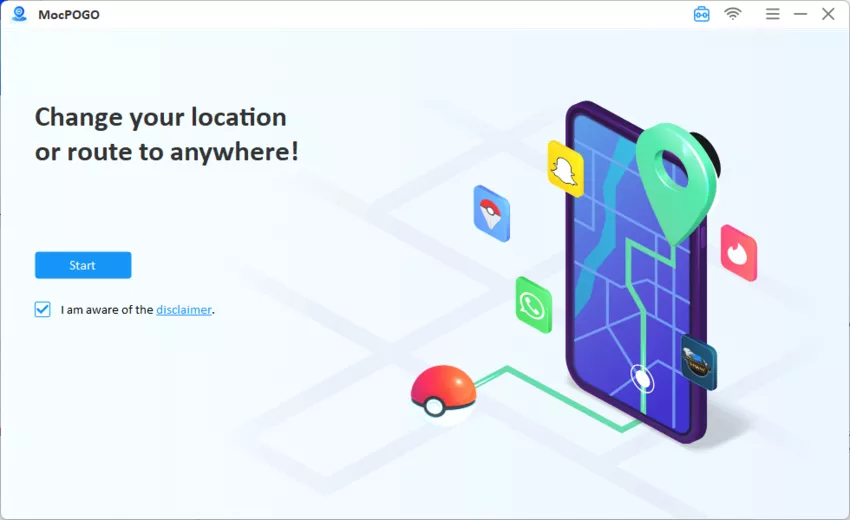
Step 1 Download and launch MocPOGO Location Changer on your PC or Mac, then connect your phone using a USB cable. Click Start.
Step 2 Choose a method such as Teleport, Joystick, or Multi-spot Route according to your desired in-game movement style.

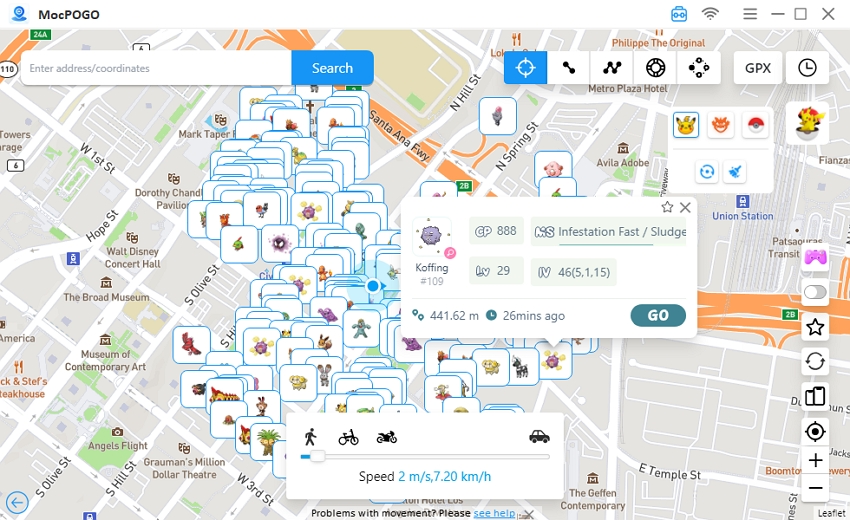
Step 3 Look for a place or just click on the map to mark your destination or path. Click go and start movement and open your Pokémon game your character will move according to the virtual location you selected.
Conclusion
Without the need for actual cards, Pokémon TCG Pocket makes gathering and fighting entertaining. You may rapidly expand your collection with daily packs, events, and new additions. To enhance the experience further, MocPOGO Location Changer offers a safe way to switch locations without root or jailbreak. It helps you access region-specific features and enjoy smoother gameplay overall.
Molly is a game fanatic who specializes in writing technology articles. In her articles, you can find many questions about game guides and solution of how to fix it. She has over 10 years of work experience in the gaming and technology industries, which makes her articles more readable.